Microsoft 365 Copilot for Excel: pricing, limits, and what it can’t do
Copilot assumes your data is already in Microsoft's cloud, already clean, and already formatted as a table. Real exports are none of those things.
Copilot in Excel is a good product. It explains formulas, builds charts, updates assumptions from plain English, and it's woven through Word, Outlook, Teams and PowerPoint in a way nothing else is. If your data already lives tidily in SharePoint, it's hard to beat.
But most business data doesn't start there. It starts as an export — from Shopify, QuickBooks, Stripe, a CRM, a client's emailed workbook. This page is about what Copilot requires before it can help, and what that costs you every month.
The short version
| Quiriz | Copilot in Excel | |
|---|---|---|
| Analyse across multiple files | Joins datasets natively | One table at a time — merge with Power Query first |
| Where the file must live | Anywhere — upload, Drive, OneDrive, email, Slack | OneDrive/SharePoint, AutoSave on |
| Messy exports | Auto-mapped and typed on import | Struggles with merged cells, multi-row headers, stray totals |
| Reads the whole table | SQL over every row | Reads "relevant sections" — partial insights |
| Same number every cycle | Governed metrics compiled to SQL | Re-derives from scratch each run |
| Google Sheets and Slack | Yes, both | Excel only |
| Cost per person | Per workspace — askers don't need seats | $32/user/month bundled with Business Premium |
| Word, PowerPoint, Outlook, Teams | Not our job | Excellent — Copilot wins this |
| Respecting existing SharePoint permissions | Our own access model | Inherits Graph permissions — Copilot wins this |
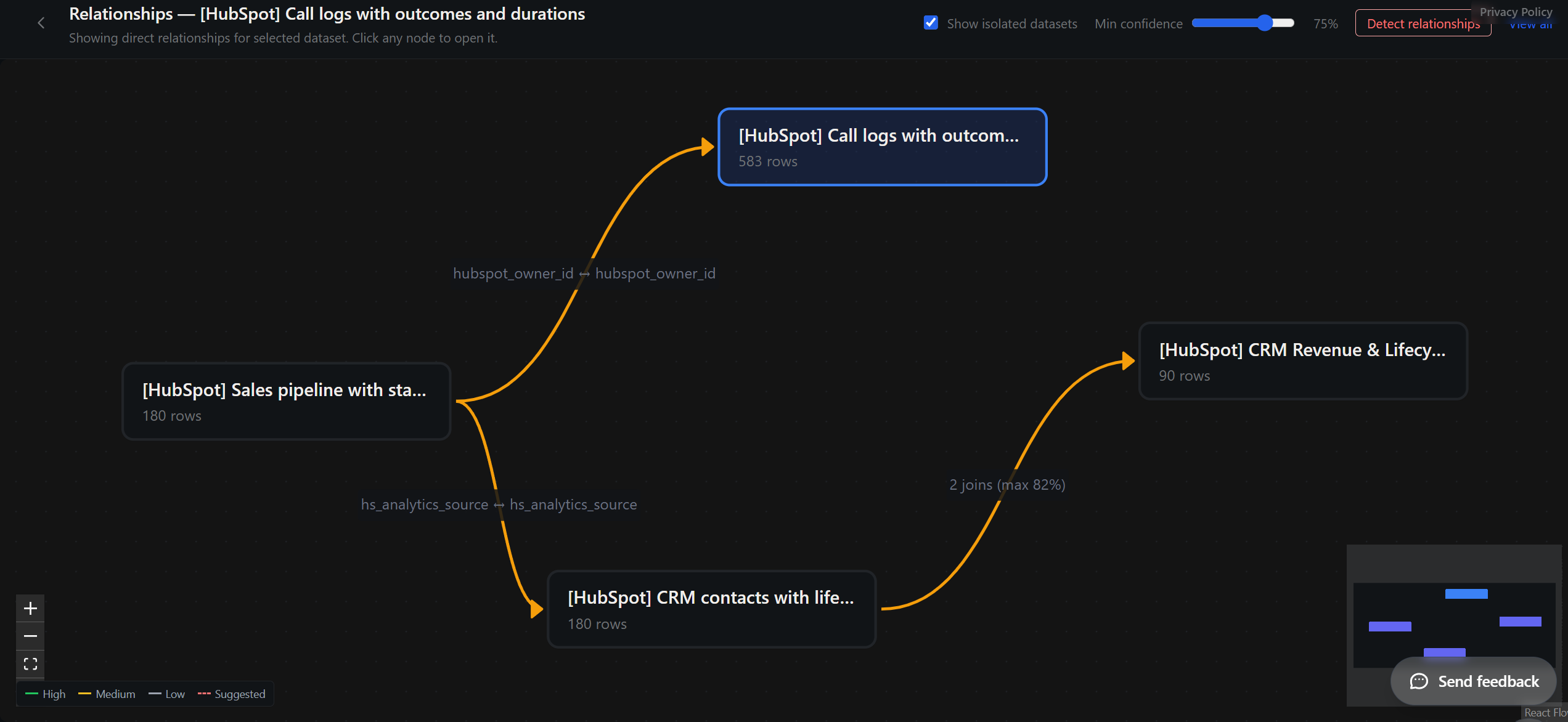
1. Copilot reads across your files. It doesn't compute across them.
This distinction does most of the work on this page. Copilot can reference and summarise other files in your SharePoint or OneDrive, and Copilot in OneDrive compares up to five at once. Useful — but summarising five documents isn't joining five datasets.
In Excel itself, Copilot works with one structured data source at a time, and it has to be a proper Excel table with headers. It reads the active table or your current selection. It can't detect or merge data from other open workbooks.
Microsoft's own answer to multi-file analysis is to merge everything with Power Query first, then format the result as a table. Which is fair advice — it's just the entire job you wanted help with. You do the joining; then the AI gets to answer.
2. "Relevant sections" is doing a lot of work
Copilot handles tables up to two million cells. But it doesn't load the whole spreadsheet into one context — it accesses relevant sections at a time, which Microsoft describes as producing accurate but partial insights on large or multi-sheet workbooks.
For summarising, that's fine. For a total, it isn't. A figure computed from part of a table is wrong, and it will foot perfectly against the part it read. Nothing in the output tells you which part that was.
There's a second version of the same problem. Copilot's documented weak spots — unstructured ranges, merged cells, hidden columns, data scattered across areas — are a fairly precise description of a real export. If a subtotal row is sitting inside your data, it gets counted as data, and every total comes out inflated but internally consistent.
Quiriz reads the whole dataset because it never reads it into a model at all: your question compiles to SQL and runs against every row. On import it also flags columns containing Total, Subtotal or All values so they're excluded from sums, rather than quietly counted twice.
3. Answers in the cell, from data nobody has open
Copilot needs the workbook open, saved in OneDrive, with AutoSave on. Quiriz's Excel add-in works the other way round — it's a window onto datasets you loaded weeks ago:
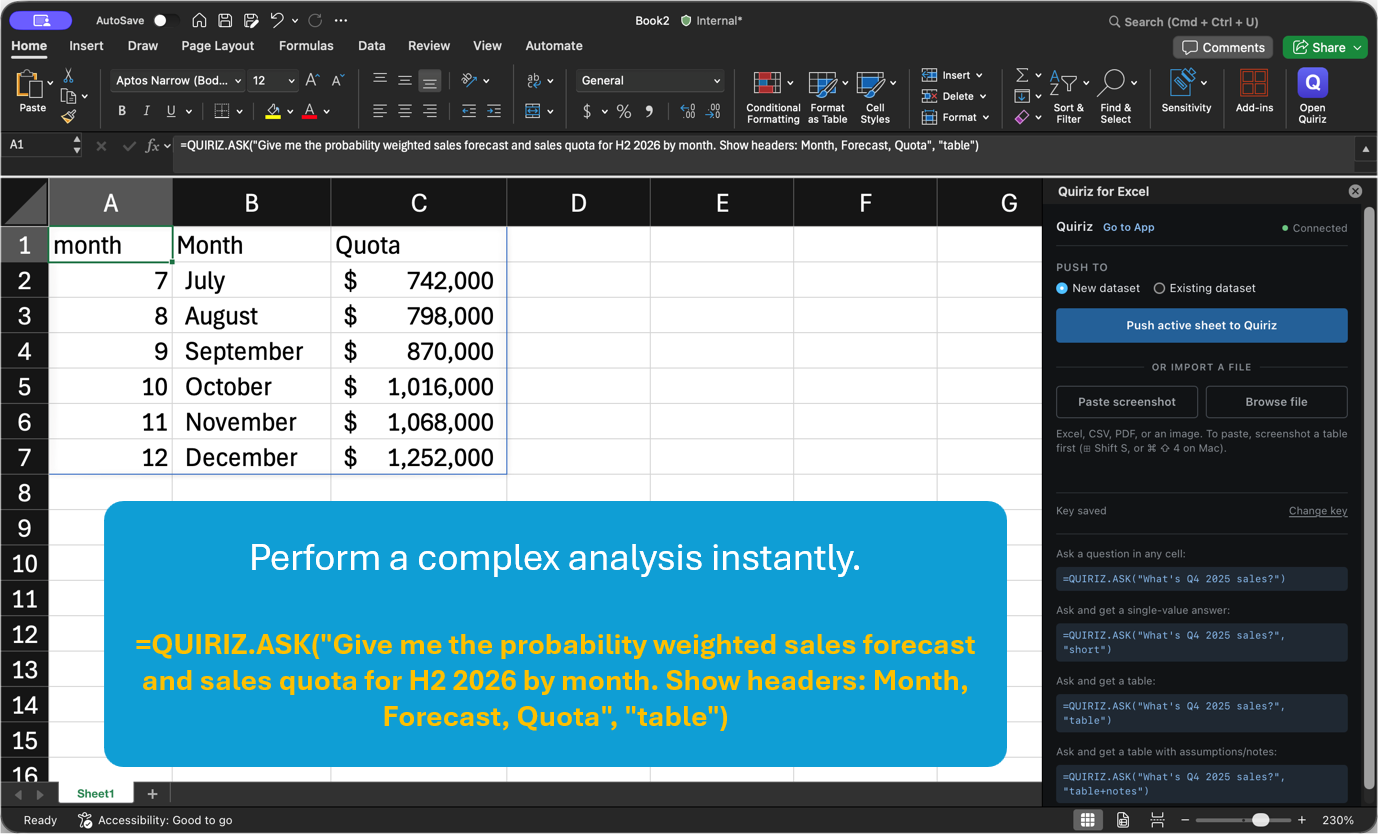
=QUIRIZ.ASK() returns the answer as a value in the cell — computed against stored datasets, joined across sources, with nothing else open. The sidebar also pushes the active sheet back into Quiriz.Try the test that separates them: open a blank sheet and ask about last quarter's revenue. A sidebar bound to the open workbook has nothing to read.
4. Getting exports in, and keeping them current
Give Copilot credit first: files already sitting in SharePoint need no upload and no refresh at all. If your data is born inside Microsoft 365, that's genuinely frictionless.
For everything else, the checklist runs: download the export → upload it to OneDrive, because Copilot can't see a file on your desktop → clean it and format it as a table with headers → merge with Power Query if it spans files → and do all of it again next month, because there's no dataset and no refresh for external data.
Quiriz: point at a folder and bulk upload, connect Drive or OneDrive for automatic updates, email a file in, or push straight from Excel, Sheets or Slack. Mapping and type detection run automatically — including the merged cells, multi-row headers, stray totals, leading zeros and text-formatted dates that break other tools. Reports re-run themselves when the data refreshes.
5. The part people get backwards
I have owned a multi-million-dollar P&L, which means I have signed off on per-seat software and then watched what happened to it. The pattern is consistent enough to plan around: you licence the people who will obviously use it, the tool becomes genuinely useful, and then the requests start arriving from people who need one number a month. At that point you are choosing between paying a full seat for a monthly question or telling that person to ask a colleague instead.
Almost everyone picks the second option, and that is where the cost actually lands. It does not show up on the invoice. It shows up as the same three people answering everyone else's questions — which is the bottleneck you bought the software to remove. When you compare per-seat pricing, price the colleagues you would not licence, because they are the ones whose time you are quietly spending.
Because Copilot comes from Microsoft, buyers assume it's the economical option. It's the opposite: at $32/user/month it's the most expensive AI option most SMBs will compare — more per person than ChatGPT Team or Claude Team.
Quiriz charges per workspace. An answer costs us a fraction of a cent to serve, so we don't meter questions and don't charge for the colleague who asks one thing a month. You pay for your data, not your people.
Where Copilot genuinely wins
Copilot inherits your Microsoft Graph permissions, so it respects SharePoint and OneDrive access control with no new configuration — if you've already modelled permissions in M365, that's real. It processes inside your Microsoft 365 tenant boundary and doesn't train on your data. And it works across Word, PowerPoint, Outlook and Teams — a spread we only partly match, and not at all in Outlook or Teams.
For a well-structured workbook already in SharePoint, analysed by one person, Copilot is a strong tool and you don't need us for it.
You probably shouldn't choose. Use both.
Most people can't remove Copilot anyway — it arrives bundled, chosen at tenant level. Fortunately the split is clean, and it follows one rule: a language model shouldn't be the thing that computes the number.
Quiriz — the number
- Ingest messy multi-source exports
- Join across datasets
- Governed metric definitions
- The same figure every cycle
- Per-step rows for audit
Copilot — everything after it
- Formatting and layout in the workbook
- Charts, conditional formatting, slicers
- Decks and documents drafted from a prompt
- Outlook drafts, Teams updates, meeting recaps
- Narrative and interpretation
Here's the neat part. Copilot's precondition is data that's already in OneDrive, already clean, already a table with headers. That's precisely what Quiriz produces. Quiriz takes the eleven messy exports, types and joins them, applies your governed definition, and writes a clean structured table into the workbook. Copilot then does what it's genuinely excellent at, on data it could never have assembled itself.
Quiriz is the Power Query step Microsoft tells you to do first — done automatically, and repeatably.
And it works in reverse. When Copilot or a colleague enriches that data in Excel, push it back into Quiriz from the add-in. It becomes a governed dataset again — versioned, scoped by business unit, team and project, refreshable, and askable from Sheets and Slack too. Otherwise an edited workbook is one person's file at one moment, with no lineage and no way for anyone else to query it.
Copilot in PowerPoint and Word
Everything above is about Excel, because that is where the two products meet hardest. But the two searches people actually run are copilot powerpoint and copilot word, and the answer there is different enough to be worth stating separately.
In PowerPoint and Word, Copilot is a drafting tool. Give it a document and it writes a deck; give it a deck and it writes a summary; ask it to rewrite a section and it does that well. It reaches your other Microsoft 365 content through Graph, which nothing outside Microsoft can do, and it is the only option here that spans all four apps plus Outlook and Teams.
What it does not do in either app is compute. It can find the spreadsheet and quote a figure from it; it cannot apply your definition of net sales across eleven exports, chart the result, and put the same number in the chart, the sentence and the summary slide. Nor does it attach anything to what it wrote: a deck Copilot drafted in March is, in April, a deck somebody has to read line by line to find out what is now wrong.
That second half is what our PowerPoint and Word add-ins are for, and the split is the same one as in Excel:
Quiriz — the numbers on the slide or page
- The question is stored on the shape or the content control
- Charts, tables, and single figures inside your own sentences
- Built in your template's layouts and theme colours
- Refresh all, and every figure moves from one reading of the data
- In Word, refreshes can arrive as tracked changes
Copilot — the words around them
- Draft a deck or a document from a prompt
- Rewrite, shorten, change the tone
- Summarise something long that somebody sent you
- Pull context from your files, mail and meetings
- Outlook and Teams, which we do not touch
Which means the honest recommendation is the same as it is for Excel: these are not alternatives. If your decks and documents are written once, Copilot is the better purchase and you do not need us. If the same review deck or client report goes out every month, the drafting is not the expensive part — the numbers are.
Longer comparisons of each field: AI add-ins for PowerPoint and AI add-ins for Word, both of which list Copilot alongside everything else.
Which one is right for you
Copilot alone is fine if…
- Your data lives in SharePoint and nobody exports anything
- Analysis is per-workbook and the workbook is tidy
- You want AI across Word, Outlook and Teams too
- One person does the analysis
Add Quiriz if…
- Data arrives as exports from several systems
- The same report goes out every cycle and must match
- Several people need answers, most only occasionally
- Some of your work happens in Google Sheets or Slack
- Different people should see different data
Also compare: ChatGPT for data analysis · Claude for Excel · AI for Google Sheets · AI in Excel: the full guide
Try it on your own data. No signup — upload a messy export and ask it something.
Try with your data → Get the Excel add-in See the Slack demo
Copilot features and pricing verified August 2026. Microsoft ships quickly — if something here is out of date, tell us and we'll correct it.
Related: AI Pricing Comparison 2026 — verified per-seat prices for Copilot, ChatGPT, Claude and Gemini and what a 10-person team really pays. AI Hallucination Statistics 2026 — why the same model scores 0.7% or 94% depending on the test.