AI for Google Sheets: what Gemini can’t do
Gemini comes free with your Workspace plan. That makes it the first thing you'll try — and the reason it's worth knowing exactly where it stops.
Let's start where most comparison pages won't: if your data is one tab and a few hundred rows, use Gemini. It's already switched on, it costs nothing extra, and it sits in the same tab as your numbers. I'd be wasting your time arguing otherwise, and I have run small companies where that was exactly the right call.
This page is about what happens after that. When the data is eleven exports from five systems, when the answer has to match last month's, and when six other people need it too — that's a different job, and it's the one Quiriz is built for.
The short version
| Quiriz | Gemini in Sheets | |
|---|---|---|
| Rows it can handle reliably | Full dataset — queried in a database | Struggles past a few hundred |
| Reach your other files | 100+ stored datasets, joined | Cannot access your Drive files |
| Same number every cycle | Governed metrics compiled to SQL | Re-derives from scratch each run |
| Getting external exports in | Folder upload, Drive/OneDrive sync, email-in | Manual import, every cycle |
| Ask from Slack | Yes — answers from your datasets | No Slack surface |
| Works in Excel too | Yes | Sheets only |
| Cost | Per workspace, unlimited asking | Included with Workspace — Gemini wins this |
| In-sheet formatting, pivots, dropdowns | Not our job | Excellent — Gemini wins this |
| Quick question on a small sheet | Works | Faster to reach — Gemini wins this |
1. The row ceiling
This is the one to check first, because it decides whether the rest of the page matters to you. Gemini in Sheets degrades past a few hundred rows. Users report lag and failures in the thousands. Past what fits in a single session, summaries become partial and data gets truncated — per-row analysis stops being feasible.
So the useful question isn't "is Gemini good?" It's: how many rows is your sales export? If the answer is five figures, Gemini isn't the tool for the arithmetic — no matter how good it is at everything else.
Quiriz doesn't read rows into a model at all. Your question is compiled into a SQL query that runs against the whole dataset in a database. Four hundred thousand rows is a query, not a reading exercise.
2. A table that foots perfectly can still be wrong
Here's a real Gemini output — contribution margin by product category, asked of a 2025 sales dataset.
Gemini's answer
| Category | Units | Net Sales | COGS | Contribution Margin | Margin % |
|---|---|---|---|---|---|
| Accessories | 1,500 | $38,213.59 | $15,330.74 | $22,882.85 | 59.88% |
| Bottoms | 2,139 | $116,576.80 | $52,512.94 | $64,063.86 | 54.95% |
| Dresses | 468 | $38,274.55 | $17,941.14 | $20,333.41 | 53.13% |
| Outerwear | 570 | $68,601.06 | $27,960.54 | $40,640.52 | 59.24% |
| Tops | 2,314 | $116,944.70 | $50,502.47 | $66,442.23 | 56.82% |
| Total | 6,991 | $378,610.71 | $164,247.83 | $214,362.88 | 56.62% |
We checked every cell. The arithmetic is right: each margin is sales minus cost, each percentage is correct to two decimals, the columns foot. It looks authoritative because it is — arithmetically.
And it still can't be used for a decision, because the output doesn't tell you:
- What "contribution margin" means here. Contribution margin is revenue less all variable costs — COGS plus payment processing, shipping, pick-and-pack, commissions. This is sales minus COGS, which is gross margin. Price a category off a "59.88% contribution margin" that's actually gross margin and the decision is wrong while every cell is right.
- What "net sales" means. Gross less returns? Less discounts? Including shipping revenue? Tax-exclusive? Five reasonable definitions, five different tables, all footing perfectly.
- Whether any rows were dropped. If some orders have a blank category, a join silently excludes them — and the totals still foot. Nothing here tells you whether 6,991 is all of them.
- Which date field, which year basis, and what happened to refunds and cancellations.
Gross margin wearing a contribution-margin label is the most expensive spreadsheet mistake I have come across, and I have met it from both sides — in companies I started and in clients I was advising. It never announces itself. Someone prices a range off a category that reads 58% profitable, the range sells, and the payment fees, shipping and pick-and-pack that were never in that 58% scale up with the volume. The P&L catches up a quarter later, by which point the price is in the market and customers are used to it.
What makes it survive review is precisely what the table above demonstrates: it is not an arithmetic error, so checking the arithmetic will never find it. Every figure reconciles. The only real defence is that the number carries its own definition — that the words "after COGS only, before fees and shipping" travel with the 58% to the person making the pricing call, instead of staying in the head of whoever ran the query.
Ask the same question next month and any of those can resolve differently, because the analysis is rebuilt from scratch every run. You'd get a second table that also foots perfectly, and nothing would flag the change.
3. What a governed answer looks like instead
Quiriz answers from a defined metric. "Net sales" means what your team agreed it means, once, and the definition travels with the answer — so the caveats arrive with the number instead of living in someone's head.
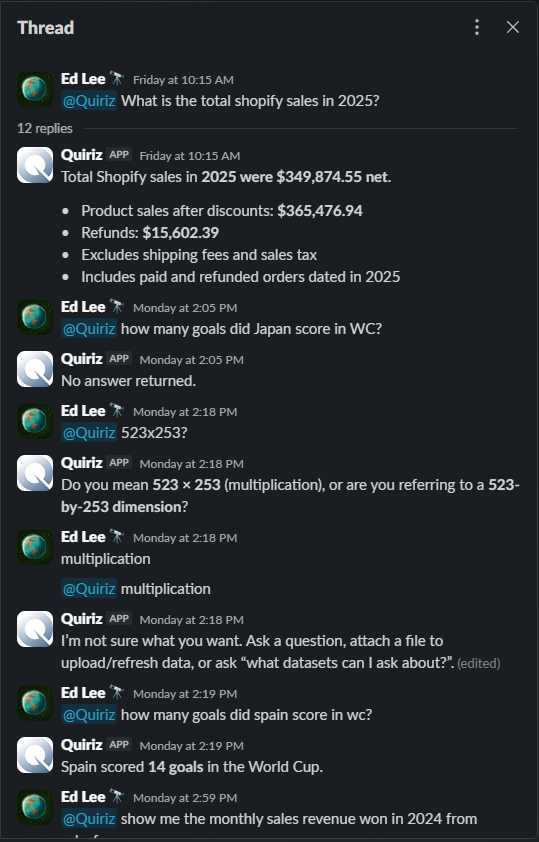
And because the definition is compiled rather than re-invented, the number is the same next month, and the same for whoever asks it.
4. Getting your data in — and keeping it current
Gemini has no dataset, no ingestion, and no refresh. It reads what's already in the sheet in front of it and cannot reach your Drive files. Every export has to be walked in by hand: download it, import it into Sheets, get it into one tab, consolidate anything that spans files — and repeat the whole thing next cycle.
Quiriz stores datasets. Point it at a folder and bulk upload. Connect Google Drive or OneDrive and let updates pull automatically. Email a file in. Push a sheet straight from the add-on. Mapping and type detection run on their own, including the parts that usually break AI tools — merged cells, multi-row headers, totals rows, leading zeros, dates stored as text.
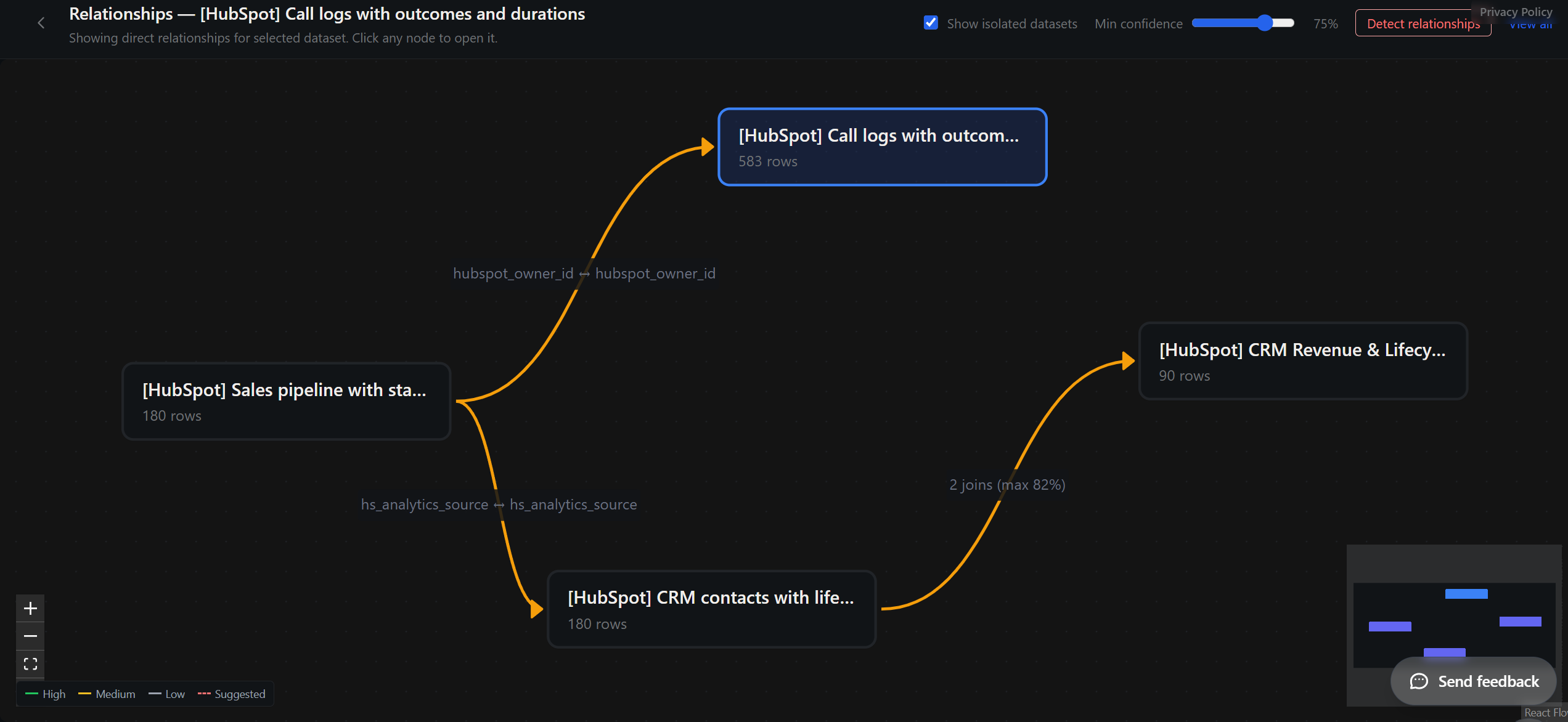
5. Everyone asks — from Slack, Sheets, or Excel
Gemini is Sheets-only and per-seat by tier. Quiriz answers wherever the question gets asked: in a Google Sheets cell, in an Excel cell, or in the Slack channel where someone actually wondered aloud. And the people asking don't need a seat — you pay for your data, not your headcount.
Where Gemini genuinely wins — including on price
Gemini is cheaper than us, and we're not going to dress that up. It's included with your Workspace plan, the monthly allowance is per user and generous enough that most people never reach it, and at the moment you decide it costs nothing extra. Quiriz costs money. If price is the deciding factor, this is a short conversation.
It's also excellent at the things it's designed for: pivots, dropdowns, conditional formatting, formula help, and building Slides decks from what's in front of it. For a quick question on a small sheet, it's already open and we're not.
One caveat worth knowing if you're on the entry tier: Business Starter only gets limited Gemini. Full Gemini starts at Business Standard, $18/user/month — so for Starter customers, "included" actually costs about $10 more per person per month.
The question this page is really asking isn't which is cheaper. It's whether a number you can define, audit, and reproduce — on a dataset bigger than a few hundred rows — is worth a workspace fee.
You probably shouldn't choose. Use both.
The split between them is clean, and it follows one rule: a language model shouldn't be the thing that computes the number.
Quiriz — the number
- Ingest messy exports from many systems
- Join across datasets
- Governed metric definitions
- Aggregate over full row counts
- Per-step rows for audit
Gemini — the presentation
- Pivots, dropdowns, conditional formatting
- Charts and in-sheet layout
- Slides decks and Docs write-ups
- Narrative and interpretation
- Formula help and sheet productivity
Concretely: don't hand Gemini four hundred thousand rows. Quiriz runs the aggregation and writes twelve rows — one per month — into your sheet. Gemini then charts it, formats it, and builds the deck, working comfortably inside the range where it's genuinely good. That's not a workaround; it's the right use of a tool with a documented row ceiling. Let it present, not compute.
It also quietly solves the "can't reach your Drive files" problem: Quiriz puts the answer in the sheet Gemini is already looking at.
And it works in reverse. When Gemini or a teammate reshapes or enriches that data, push it back to Quiriz from the add-on. It becomes a governed dataset again — refreshable, scoped by team and project, and askable from Excel and Slack by people who were never in that spreadsheet. Otherwise a good piece of analysis stays as one person's tab, at one moment in time, with no lineage.
Which one is right for you
Stick with Gemini if…
- Your data is one sheet, a few hundred rows
- You want formula help, pivots, formatting
- Everything lives in Drive and nobody needs answers elsewhere
- You ask occasionally, well inside the cap
Add Quiriz if…
- Data arrives as exports from several systems
- The same report goes out every cycle and must match
- Several people need answers, most only occasionally
- Answers belong in Excel or Slack, not just Sheets
- Different people should see different data
Also compare: ChatGPT for data analysis · Claude for Excel · Microsoft 365 Copilot · AI in Excel: the full guide
Try it on your own data. No signup — upload a messy export and ask it something.
Try with your data → Get the Sheets add-on See the Slack demo
Gemini features verified August 2026. Google ships quickly — if something here is out of date, tell us and we'll correct it.
Related: AI Pricing Comparison 2026 — verified per-seat prices for Copilot, ChatGPT, Claude and Gemini and what a 10-person team really pays. AI Hallucination Statistics 2026 — why the same model scores 0.7% or 94% depending on the test.