ChatGPT for Excel and data analysis: where it stops
ChatGPT is a genuinely excellent analyst — for one file, for one person, right now. That's not the job most teams actually have.
Upload a spreadsheet to ChatGPT, ask a question, and it will write and run real code against your data. For a one-off question about a file on your desktop, it's hard to beat, and I'm not going to pretend otherwise.
I have been on three sides of a reporting problem in twenty-five years: as a management consultant selling the analysis, as the owner of a multi-million-dollar P&L waiting on it, and as the person running business intelligence for a large enterprise. The tooling changed beyond recognition over that period. The failure did not. So this page compares the two tools on the job that actually breaks — not answering a question, but answering it the same way next month, for someone who was not in the room.
The job most teams have looks different: eleven exports from five systems, a report that has to come out the same way every month, and six colleagues who need answers without becoming spreadsheet people. Here's the honest comparison.
The short version
| Quiriz | ChatGPT | |
|---|---|---|
| Datasets you can keep | 100+ | 20–40 files per project, 10 per upload |
| Answers in Excel / Sheets cells | =QUIRIZ.ASK() returns the value |
Sidebar works on the open workbook |
| Keeping data current | Drive, OneDrive, email, Excel, Sheets, Slack | Manual re-upload — project files don't sync |
| Same number every cycle | Governed metrics compiled to SQL | Re-derives from scratch each run |
| Ask from Slack | Answers from your datasets | Searches your Slack messages, not your data |
| Cost for 12 occasional askers | Included — no per-asker seat | ~$25/seat/month, each |
| Who sees which data | Company, business unit, team, project | No dataset-level access control |
| One-off analysis of a file you have open | Good | Excellent — ChatGPT wins this |
| Statistics, forecasting, ML | Not supported | Excellent — ChatGPT wins this |
1. The file ceiling
Check this one first, because it's arithmetic rather than opinion: how many exports does your monthly reporting pack touch? If it's more than a few dozen, ChatGPT Projects can't hold them — on any tier.
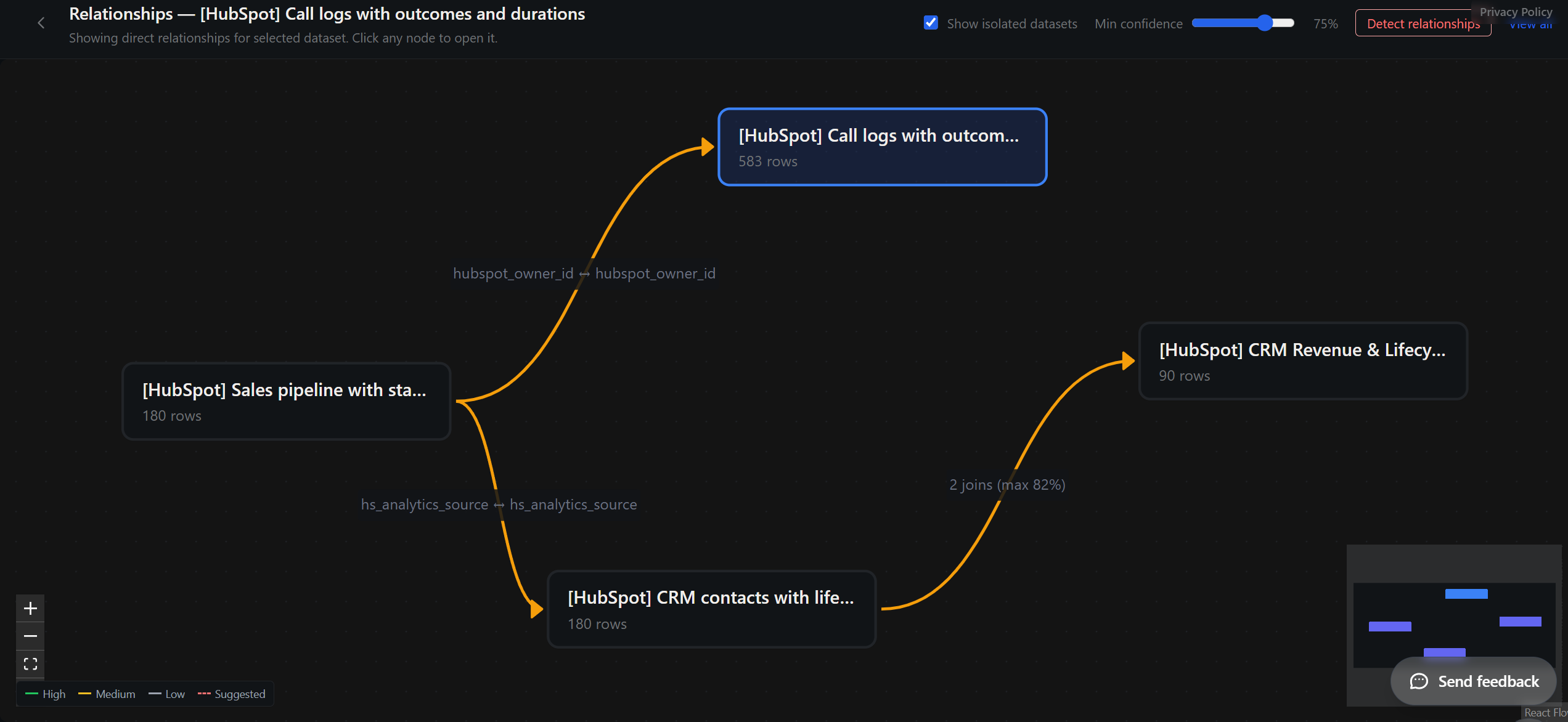
Quiriz stores 100+ datasets and picks the right ones from your question, so nobody has to remember which file holds what. The answer names the datasets it used.
2. Answers in your spreadsheet, from data that isn't open
ChatGPT for Excel and Google Sheets shipped in May 2026 and it's a good product. Note the constraint though: it reads the workbook you have open. It's an assistant for the file in front of you, not a window onto the other eleven.
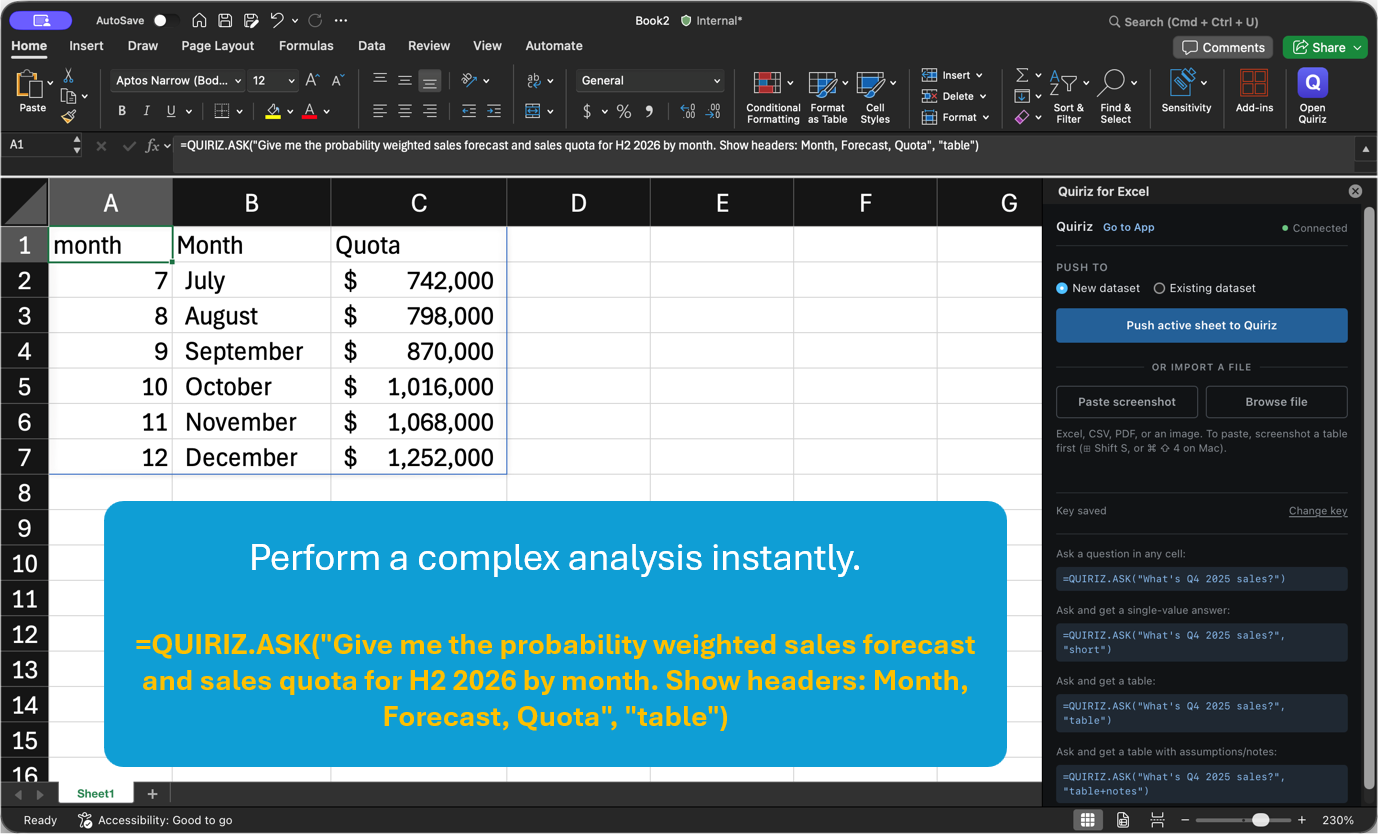
=QUIRIZ.ASK() returns the number in the cell — computed against datasets you loaded weeks ago, in files nobody has open. It refreshes like any other function.The test that separates them: open a blank sheet and ask about last quarter's revenue.
3. Keeping the data current
ChatGPT Projects hold files persistently — that part works. The problem is month two. Project files are static: you upload once and update manually when they change. Projects don't sync with the source document. The Google Drive connector is Workspace-only and, by OpenAI's own account, does little with Sheets and Excel files — the two formats that matter here. And since August 2026, individually authorised sync connections are gone; only administrator-managed sync remains, which turns a user task into an IT ticket.
So somebody re-uploads. Every cycle. And every stale answer traces back to whether they remembered.
Quiriz: point at a folder and bulk upload, connect Drive or OneDrive for automatic updates, email a file in, or push from Excel, Sheets or Slack. Reports that depend on a dataset re-run themselves when it refreshes.
4. The same number every time — with no setup project
Ask ChatGPT the same question about the same data twice, a month apart, and you can get two different numbers. That isn't a bug and better prompting doesn't fix it — it's what happens when a probabilistic model writes the query fresh on every run.
Two things drift independently: how the question becomes a query, and which rows it actually sees — past the context budget, retrieval pulls fragments, and a total computed over a fragment is wrong without telling you.
You can fix both in ChatGPT — by building a data stack. Point it at a governed semantic layer through a connector and it returns trusted numbers. That needs a warehouse, a modelling project, an engineer, and the plumbing between them.
When I ran business intelligence for a large enterprise, the recurring meeting was never about strategy. It was two people holding two revenue figures, working backwards to find where they diverged. The answer was almost always dull: one had excluded intercompany, or booked the credit note in the month it was raised rather than the month it applied to. Neither person was wrong. The two numbers had simply never been made to agree, and nobody had written down which convention won.
That is what makes me wary here, and it is not a criticism of the model. The disagreement was never really about the tool. It was about a definition nobody had committed to paper. A chat assistant does not create that problem — but it does industrialise it. Every colleague who asks gets a number derived fresh, and none of them can see which of those choices were made on the way. Before, we had two versions of revenue and a meeting. Now you can have twelve, and they arrive faster than anyone can reconcile them.
Quiriz ships that layer in the box. Define what "revenue" means once, in a builder with no SQL. From then on the definition compiles to a query and runs against every row — same answer on Tuesday as last quarter, whoever asks, from whichever surface.

5. Ask in Slack — and colleagues don't need a seat
ChatGPT has a Slack app, and it's worth knowing exactly what it does, because the names are confusingly similar: it searches your Slack messages, threads and files to ground answers in conversation history. It answers questions about what your team said. It doesn't answer questions about your revenue data.
Quiriz's Slack bot answers from your datasets, in the channel where the question was asked — and the people asking don't need seats. With ChatGPT, the twelfth colleague who asks one question a month is another ~$25/month subscription. You pay for your data, not your people.
6. Speed — and what's actually being compared
We asked both the same question, on the same data, in August 2026: "Show net sales by month in 2025."
One question, asked of both tools in August 2026 against the same file, timed from submitting the question to a readable answer on screen. A single run each on a normal broadband connection — not an averaged benchmark, and not a claim about either product's typical speed.
Treat it as an illustration of why the two differ rather than a score. Your file, your question and your connection will produce different figures; the mechanism below is the part that transfers.
ChatGPT analyses by loading rows — into a context window, or into a Python sandbox where it writes and runs code. Quiriz compiles the question to SQL and runs it against the database. No file to parse, no dataframe to load, no sandbox to start.
But the timing is the smaller point. The two answers aren't the same artifact. One arrives with a definition behind it and per-step rows you can download and reconcile; the other arrives as a table. Both are fast. Only one is checkable.
Where ChatGPT genuinely wins
For one file and one question, dragging it into a chat beats setting anything up. For statistics, forecasting, regression or machine learning, ChatGPT writes and runs real Python — Quiriz answers business questions over your data, it doesn't fit models. For open-ended exploration where you don't yet know the shape of the question, it's the better tool. And if you're one person and nobody else needs the answers, most of this page doesn't apply to you.
You probably shouldn't choose. Use both.
The split is clean, and it follows one rule: a language model shouldn't be the thing that computes the number.
Quiriz — the number
- Ingest messy exports from many systems
- Join across datasets
- Governed metric definitions
- The same figure every cycle, for everyone
- Per-step rows for audit
ChatGPT — everything after it
- Narrative and recommendation
- Decks, memos, client emails
- Charts, dashboards, presentation
- Forecasting, statistics, modelling, code
- Exploring what the number means
In practice: ask Quiriz the governed question, download the per-step rows, and hand that CSV to ChatGPT for the chart, the deck or the write-up — it's now working from a defined, auditable number instead of guessing at your raw file. Or drive Quiriz from an agent directly: we expose a CLI and MCP surface, so a tool-using assistant can query the governed layer instead of re-deriving an answer from files it half-read.
And close the loop. When ChatGPT enriches or reshapes that data, push it back into Quiriz. It becomes a governed dataset again — scoped by team and project, refreshable, and askable from Excel, Sheets and Slack by people who were never in your chat. Otherwise good analysis stays trapped as one person's conversation: no lineage, no sharing, gone next month.
What each is for: ChatGPT is a brilliant analyst who starts fresh every morning with no memory of what your team agreed "revenue" means. Quiriz is the institutional memory that hands it the right number to work from.
Also compare: Claude for Excel · Microsoft 365 Copilot · AI for Google Sheets · AI in Excel: the full guide
Try it on your own data. No signup — upload a messy export and ask it something.
ChatGPT features and pricing verified August 2026. OpenAI ships quickly — if something here is out of date, tell us and we'll correct it.
Related: AI Pricing Comparison 2026 — verified per-seat prices for Copilot, ChatGPT, Claude and Gemini and what a 10-person team really pays. AI Hallucination Statistics 2026 — why the same model scores 0.7% or 94% depending on the test.