Best Free AI Data Analysis Tools in 2026
Real free tiers, honestly compared. Which free AI data analysis tools actually let you analyze CSV and Excel data in plain English, and exactly where each free plan runs out.
"Free" is doing a lot of heavy lifting on some of these pricing pages. A handful of tools genuinely hand you a plan you can use forever; others stamp "free" on what's really a trial with a countdown. So I went through the free AI data analysis tools actually worth bothering with in 2026 and wrote down what each free tier really gets you, and the point where it quietly runs out.
One thing up front: we make Quiriz, which is on this list. I've tried to keep it fair, competitors and all, and the free-tier numbers come straight from each vendor's pricing page as of July 2026. They shuffle these around a lot, so double-check before you count on anything.
These are all upload-a-file tools. If you want the AI inside the spreadsheet instead, the free tiers work differently there — the directory of AI add-ins for Excel covers which ones are genuinely free and which just have a trial.
What "free" actually means here
Almost every free plan boxes you in one of three ways: a set number of questions or messages a month, a pool of credits that each question nibbles at, or a ceiling on datasets and storage. For kicking the tyres and light use, that's plenty. You'll feel the wall when you run out of the monthly allowance, or the day you need team features and automatic refresh.
Worth setting expectations on accuracy before you pick one, too: on published benchmarks the model behind the tool matters far less than most comparisons imply, and multi-step questions fail across the board. How accurate AI is at analysing data has the numbers and what actually moves them.
The best free AI data analysis tools compared
| Tool | Free tier | Best free for | Main free-tier limit |
|---|---|---|---|
| Quiriz | Free forever | Teams | Usage caps; shared datasets included, not per-seat |
| Powerdrill | Free forever | CSV/Excel Q&A | Monthly + one-time quotas |
| ChatGPT | Free tier | Ad-hoc file analysis | Limited data-analysis usage |
| Julius AI | Free | Solo chart-making | ~15 messages / month |
| camelAI | Free | Database Q&A | 1 workspace, 5 GB, 2 daily jobs |
| Querri | Free | Shared dashboards | 15 credits, 50 MB, 7-day retention |
| Formula Bot | Free | Excel formulas | 10 messages, 25 AI Actions, 5 MB files |
| Anomaly | Free | Quick insights | ~30 credits / month |
Free tiers and limits change frequently, so confirm current numbers on each provider's pricing page before committing.
The picks in detail
Quiriz Best free tool for teams
Most free plans quietly punish teams by charging per seat. Quiriz doesn't. Its free plan lets a whole team import CSV and Excel files, ask questions in plain English, and share the answers, with no charge for each extra person. The shared datasets live in the free tier itself, so getting a second or third teammate onto the same data costs you nothing.
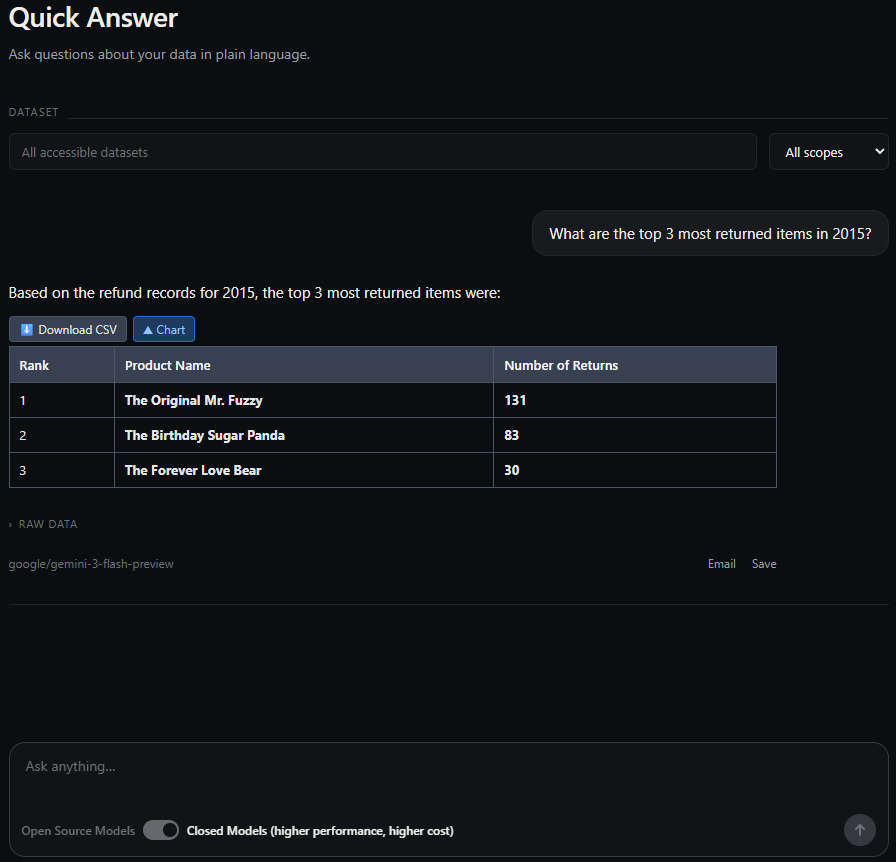
Free limit: monthly usage caps; upgrade for higher usage, larger files, and automatic refresh. Try it free →
Powerdrill Best free for CSV/Excel Q&A
Of the free-forever tiers here, Powerdrill's is one of the more generous. Upload CSV, Excel, TSV or SQL files, ask questions in everyday language, and you get charts and insights back right away. For one person doing regular spreadsheet Q&A, it's tough to beat at this price.
Free limit: monthly and one-time quotas on analysis.
ChatGPT (free tier) Best if you already use it
You probably already have this one. ChatGPT's free tier includes a limited slice of Advanced Data Analysis, so you can drop in a spreadsheet and start asking questions. Handy for one-off work, though nothing sticks around: no saved datasets, no refresh.
Free limit: capped data-analysis usage; no persistent datasets.
Julius AI Best free for solo charts
Julius runs a notebook-style workflow and hands you a fairly stingy free allowance, roughly 15 messages a month. That's enough for the occasional deep dive into one file. Not much beyond that.
Free limit: around 15 messages per month.
camelAI Best free for databases
camelAI is the odd one out here. It's built for databases, so if that's where your data lives, its free tier lets you ask questions in everyday language and even schedule a couple of jobs. Just know it leans less toward CSV and Excel than the rest of this list.
Free limit: 1 workspace, 5 GB storage, 2 daily cron jobs.
Querri Best free for dashboards
Querri's angle is dashboards. The free plan turns an upload into something shareable and lets unlimited viewers look at it, which sounds great until you notice how tight the credits are.
Free limit: 15 credits, 50 MB, and 7-day retention. Every viewer question spends credits too.
Formula Bot Best free for Excel formulas
Formula Bot started life as an Excel formula generator, and that's still where its free tier earns its keep: describe what you want in plain English, get the formula back. It has grown into a fuller data analyst since, with chat over your files and dashboards, but the free plan is where you'll feel that ambition bump into the ceiling. Ten messages a month goes fast, and the 5 MB upload cap rules out most real spreadsheets.
Free limit: 10 messages and 25 AI Actions per month, 5 MB file uploads, basic model only.
Anomaly Best free for quick insights
Anomaly keeps it simple. Point it at Excel or another source and it produces insights and charts. The free tier is credit-metered, so figure on about 30 questions' worth a month before it asks you to pause.
Free limit: around 30 credits per month.
Which free tool should you pick?
- Working solo, mostly CSV or Excel Q&A? Powerdrill's free-forever tier is the one to start with.
- Already living in ChatGPT? Just lean on its built-in data analysis.
- Only need the odd deep dive into a single file? Julius will cover it.
- Really just want the Excel formula written for you? Formula Bot does that better than anything else here.
- A whole team that wants shared answers for $0? That's Quiriz.
Want the full paid picture too? See our comparison of the best AI tools for Excel data analysis.
Start analyzing your data free
Import a CSV or Excel file, ask a plain-language question, and get your answer back in seconds. No card required.
Try Quiriz free →Frequently asked questions
Is there a free AI tool for data analysis?
What is the best free AI data analysis tool?
Are free AI data analysis tools good enough?
Free-tier details are as published by each vendor as of July 2026 and change often, so confirm current limits before relying on them.