What Is AI Data Analytics? Tools, Examples & How to Start
Artificial intelligence for data analysis lets anyone question their data in ordinary language. Here's what AI data analytics is, how it works, what an AI data analyst actually does, and how to get started.
Ask most people to pull "revenue by region for last quarter" and they'll either file a ticket with the data team or lose an afternoon to VLOOKUP. Knowing the question but not the tool is the whole problem, and it's exactly what AI data analytics closes. You ask in words; the software works out the calculation, runs it, and hands back the answer. Below: what AI data analytics actually is, how it works under the hood, which tools are worth knowing, and how to start.
What is AI data analytics?
AI data analytics is what you get when you point a large language model at your data and let people ask questions in ordinary language instead of code. Instead of writing a query, you type "which region grew fastest last quarter?" and the AI turns that into the right calculation, runs it against your data, and tells you what it found. No syntax, no cell references.
The real break from old-school business intelligence is about who does the work. A BI tool hands you the dashboard and expects you to build it; artificial intelligence for data analysis lets you skip straight to the question. Honestly, that's the part I find most underrated: the skill that matters shifts from remembering formulas to knowing what to ask.
That shift matters more than it sounds, because the starting point is worse than most people assume: around 94% of consequential business spreadsheets contain errors, and roughly half of the models mid-sized and large companies rely on carry a defect big enough to change the result. The sourced figures are in our spreadsheet statistics roundup.
How AI data analytics works
Under the hood, a decent AI data analytics tool moves through four steps:
- Understand. The AI reads your question alongside your data's structure: columns, types, relationships.
- Translate. It converts that question into a real query or calculation, whether that's SQL, Python, or a formula.
- Execute. It runs that calculation against your actual data, not from memory.
- Explain. It returns the number, table, or chart with a summary you can read at a glance.
That third step is the one to watch. A tool that runs a real query on your data gives you a number you can stand behind. A tool that merely sounds confident, answering from the model's memory, will make things up sooner or later. So if you remember one thing here, make it this: always ask how the tool arrives at its numbers.
What an AI data analyst does
An AI data analyst is a tool that plays the part of a capable junior analyst. Hand it a dataset and a question and it picks the method, runs the numbers, and shows you the result. It won't replace senior judgment; deciding what to ask, and what to do once you have the answer, is still a human job. What it does replace is the slow middle: the querying, charting, and report-building that used to eat whole afternoons.
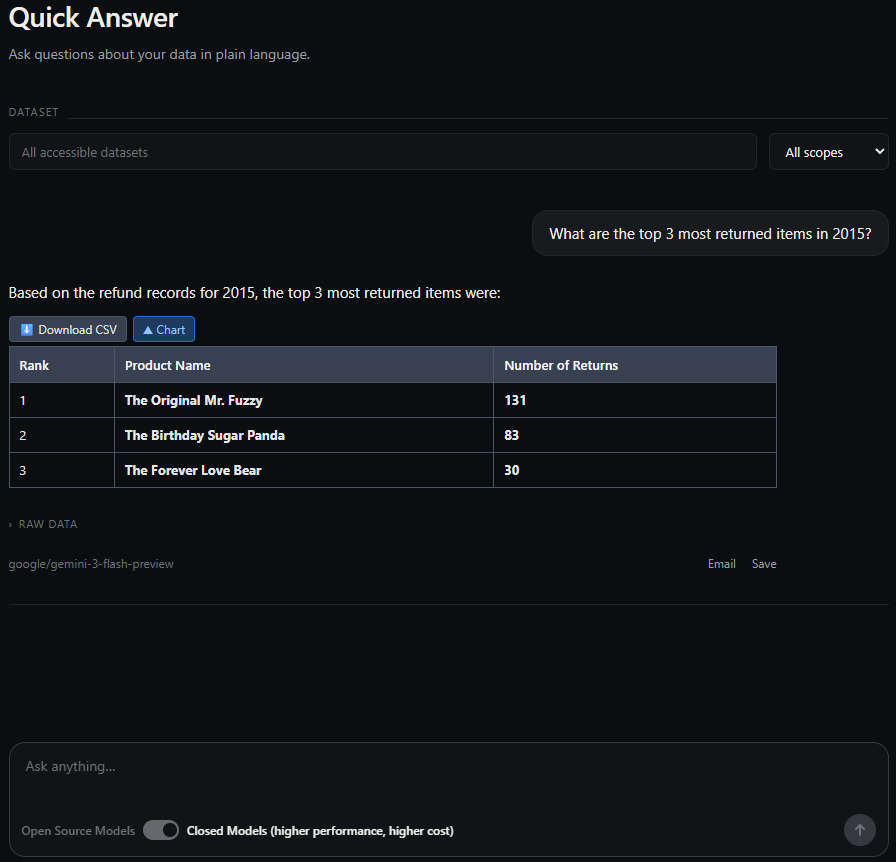
AI data analytics tools
The market sorts into three rough groups:
- General assistants like ChatGPT and Claude. Upload a file and ask away. Flexible, but nothing sticks around: no saved datasets, no refresh.
- Copilots such as Microsoft 365 Copilot and Gemini in Sheets. AI baked into the spreadsheet you already use.
- Dedicated AI data analytics platforms, built to import datasets, answer in everyday language, and share reports across a team. This is where Quiriz sits.
We put ten of these head to head in our comparison of the best AI tools for Excel data analysis, scored on features, collaboration, and price.
How to get started with AI data analytics
- Pick one dataset. A sales export, a finance sheet, last month's marketing report; anything you know well.
- Choose a tool. A general assistant for a one-off look, a dedicated platform when you'll run the analysis again and again.
- Ask a real question in your own words, then check the answer against something you already know. That's how you build trust in the tool.
- Turn it into a report you can rerun, so the work compounds instead of getting thrown away each month.
If you need to make the case internally, the adoption numbers are on your side and the ROI numbers are not, at least not yet: about 78% of organizations now use AI in at least one function and roughly 52% of employees use it in their role, but only around 29% report significant return. Our AI at work statistics roundup goes through why those three figures disagree.
Once you're running the same analysis regularly, the next win is removing the manual upload entirely. Here's how to build a fully automated data pipeline that feeds a SaaS tool's data into an AI analytics platform on its own.
Try AI data analytics on your own data
Import a spreadsheet, ask a question in plain English, and get a grounded answer in seconds. Free to start.
Try Quiriz free →Frequently asked questions
What is AI data analytics?
What does an AI data analyst do?
What is the best AI for data analysis?
Can AI really do data analysis accurately?
Tool capabilities and pricing referenced are as published by each vendor as of July 2026 and change often.